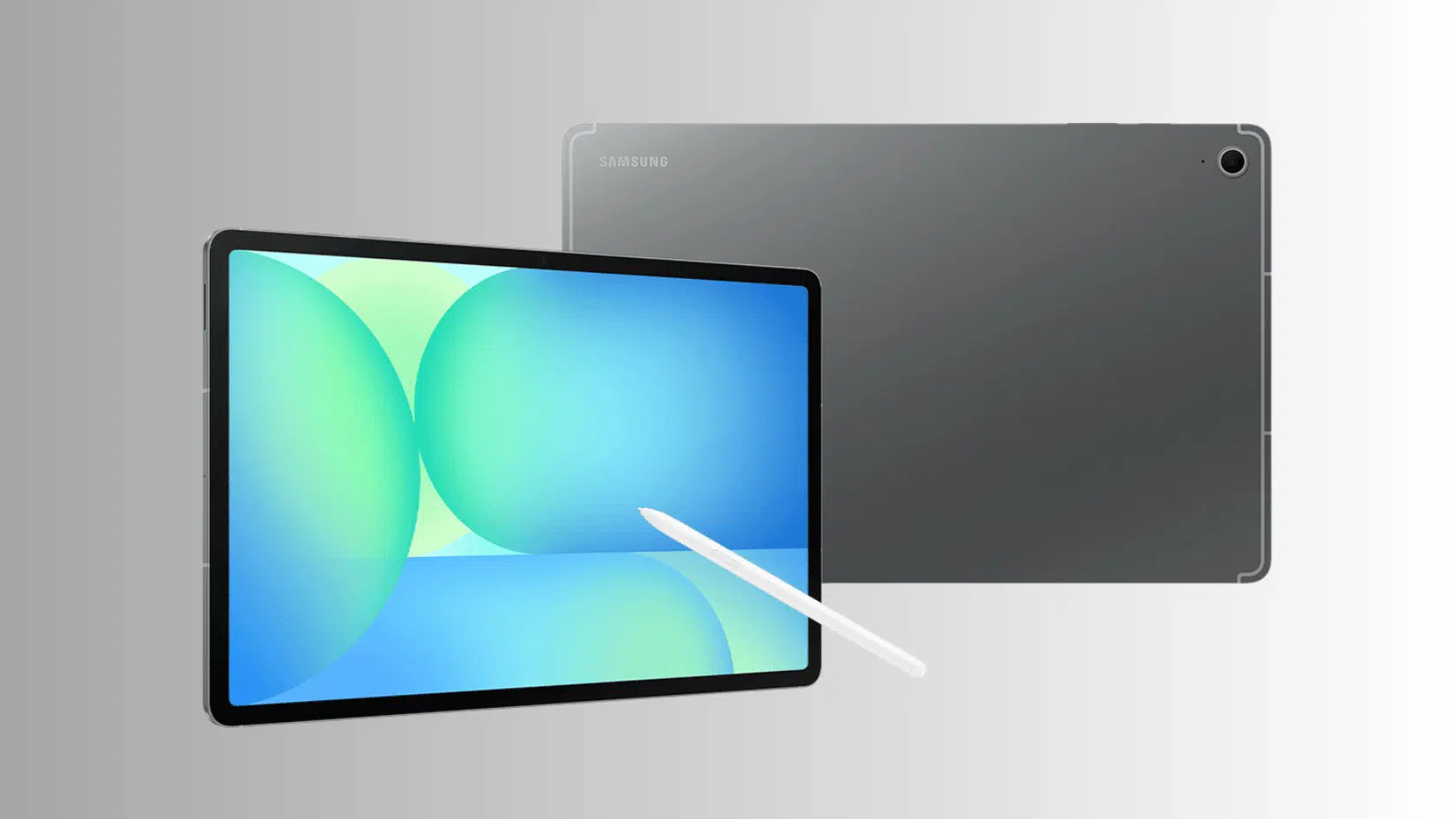



The Samsung Galaxy Tab S10 FE sits between affordable Android tablets and Samsung’s more expensive flagship models, promising a balance of performance, productivity, and portability.
Its 10.9-inch 90Hz display, Exynos 1580 processor, included S Pen, IP68 rating, and 8,000mAh battery make the specifications appealing, but compromises such as the TFT LCD and midrange processor also matter.
This review examines its display, performance, battery life, software, connectivity, strengths, and weaknesses.
Keep reading to see whether the Galaxy Tab S10 FE offers enough value for your needs.
Samsung Galaxy Tab S10 FE Design and Display
I found it slim and light enough to carry all day. The metal body feels solid and gives it a polished look without adding bulk, and the IP68 rating means it can handle everyday dust and water exposure.
The thin profile makes it easy to use at work, in class, or while traveling. The 10.9-inch TFT LCD has a 2304 × 1440 resolution and 90Hz refresh rate, keeping text sharp while making scrolling and animations feel smoother.
It also leaves plenty of room for split-screen tasks and note-taking, and the S Pen feels smooth to use on it.
Since this is not an AMOLED panel, blacks look a little less deep, but the screen still works well for studying, browsing, and everyday office work.
Samsung Galaxy Tab S10 FE Performance
The Exynos 1580 provides enough performance for browsing, streaming, note-taking, video calls, and everyday multitasking.
Apps generally open quickly, and split-screen use works well for lighter productivity tasks. For students and everyday users, performance is more than adequate.
The tablet can also handle casual gaming, but buyers should not expect flagship-level performance from demanding games, emulation, or intensive video editing.
However, users planning heavy creative workloads or high-end gaming may be better served by a more powerful premium tablet.
Tip: The Samsung Galaxy Z Fold7 is one option worth considering for heavier performance needs.
Key Samsung Galaxy Tab S10 FE Features
Beyond the specs on paper, these are the features that shape how the tablet actually feels to use every day. From battery performance to everyday multitasking, here’s what stood out most in daily use.
1. Battery Life and Charging Speed

The 8,000mAh battery easily covers a full day of streaming, browsing, and casual gaming without a mid-day charge.
Actual runtime depends on screen brightness and background apps, but Samsung’s power-saving mode helps stretch it further when needed.
Charging comes through 45W wired fast charging, which refills the tablet quickly with the right adapter.
Note: Samsung doesn’t always include the charger in the box, so you may need to buy one separately.
2. Samsung DeX for Desktop-Style Multitasking

Samsung DeX turns the tablet into something closer to a small laptop. It lets you open several apps in resizable windows, drag files between them, and switch tasks the way you would on a computer screen.
This comes in handy for writing reports, checking emails, and referencing a document at the same time, all without needing a separate laptop nearby.
It also connects with a keyboard and mouse, so the setup can feel even closer to a full desktop when needed.
Note: For buyers deciding between a tablet and a laptop for daily work, a MacBook vs iPad comparison covers the trade-offs in more detail.
3. S Pen for Notes and Everyday Creativity

The included S Pen goes beyond basic scribbling; it works well for jotting quick notes, marking up documents, and sketching ideas on the fly.
Since it comes in the box at no extra cost, students and professionals get a stylus ready to use right out of the package, which is a nice bonus compared to tablets that sell the pen separately.
It also feels responsive enough for quick annotations, with no noticeable lag between the tip and the screen.
4. Long-Term Software and Security Updates

Samsung backs this tablet with several years of software and security updates.
That means the Tab S10 FE keeps getting new features and stays protected against security risks well after the first year.
For anyone planning to keep a tablet for a while, this kind of long-term support adds real value and helps the device stay useful longer.
Samsung Galaxy Tab S10 FE Specs at a Glance
Here is a quick breakdown of what this tablet offers on paper, so you can compare it with other options. These specs cover everything from the chipset to connectivity and give you a clear picture before you spend your money.
| Specifications | Details |
|---|---|
| Processor | Exynos 1580 chipset, built for daily apps, browsing, streaming, and multitasking |
| Display | 10.9-inch TFT LCD, 2304 x 1440 resolution |
| RAM and Storage | Multiple RAM and storage configurations, expandable through microSD |
| Battery | 8,000mAh |
| Charging | 45W wired fast charging |
| Operating System | One UI on Android, with Samsung ecosystem support |
| Multitasking Tools | Split-screen support and Samsung DeX |
| S Pen | Included in the box for notes, sketches, and daily tasks |
| Build | Metal body, IP68 rating for dust and water resistance |
| Connectivity | Wi-Fi 6, optional 5G, Bluetooth support |
| Audio | Dual AKG-tuned speakers, no 3.5mm headphone jack |
| Software Updates | Long-term software and security updates from Samsung |
Samsung Galaxy Tab S10 FE Price and Availability
This comes in multiple configurations, with pricing depending on storage, connectivity options, and region.
1. Wi-Fi Model: Starts at around $419 in the U.S for the base storage option, making it one of the more affordable ways to get Samsung’s One UI experience, S Pen support, and a large display without paying extra for 5G.
2. 5G Model: Priced higher than the Wi-Fi version depending on storage, this variant adds mobile data support so you can stay connected on the go, even without Wi-Fi, which is useful for travel or outdoor work.
3. Storage Options: Offered with different internal storage capacities to fit different budgets, and every variant supports microSD expansion so you can add more space later without paying for higher storage upfront.
4. Buying Options: Available through Samsung’s official website, authorized online retailers like Amazon and Flipkart, and select offline retail stores, giving buyers several convenient ways to purchase the tablet.
5. Deals and Offers: Pricing may shift during festive sales, bank card promotions, or exchange offers, so it often pays to compare deals across platforms before buying to get the best possible price.
Budget-conscious buyers can also compare this model against the Samsung Galaxy Tab A9 for a lower-cost alternative.
Audio and Connectivity
The Samsung Galaxy Tab S10 FE gives a practical audio and connectivity setup for entertainment, communication, and daily work.
Its dual speakers, tuned by AKG, produce clear sound for videos, online meetings, and music. The Samsung Galaxy Buds FE is one compatible wireless option for this setup.
The tablet doesn’t have a 3.5mm headphone jack, so I’ll need Bluetooth earphones or a compatible USB-C adapter for wired audio.
It supports Wi-Fi 6, which gives me a stable connection for streaming, browsing, and file downloads. Some versions also include 5G for mobile internet access.
Bluetooth support makes it easy for me to connect keyboards, earbuds, and other accessories. Overall, the audio quality and connection options work well for study, work, and entertainment.
Samsung Galaxy Tab S10 FE Pros and Cons
The Samsung Galaxy Tab S10 FE offers a balanced mix of performance, display quality, software features, and portability.
| Pros | Cons |
|---|---|
| Slim metal design with an IP68 rating for added protection | TFT display instead of an AMOLED panel |
| Includes S Pen support for notes, drawing, and productivity | No 3.5mm headphone jack |
| Exynos 1580 processor provides smooth everyday performance | Accessories may increase the overall cost |
| 8,000mAh battery with 45W charging support | Performance may not match higher-end flagship tablets |
| Long software support and One UI features | Base storage options may feel limited for some users |
| Wi-Fi 6 and optional 5G connectivity options | Charger availability may vary by region |
Samsung Galaxy Tab S10 FE Community Reviews
Reddit users broadly praise its multi-day battery and sleek design, though power users caution against its non-OLED screen and mid-tier processor.
“It’s a good daily tablet for office and school stuff, Just the right amount of good display, performance, beefy battery, and most of the One UI features makes it a good option at its price range.” Reddit
The reviewer finds the upgraded Exynos processor and 8GB RAM sufficient for smooth multitasking, media streaming, and school tasks.
“Bottom line, if it’s for note taking, watching movies, browsing S10 FE is a good enough device. But if you plan on doing heavier stuff, like heavy 4K video editing with multiple 4K streams, emulation , and whatnot I’d go with something more powerful.“ Reddit
This user notes that while the non-OLED display is sharp and comfortable on the eyes for extended reading, raw performance trails high-end flagships.
“Fast — no lag. I don’t know if I’d play high end games on it, but for just reading and browsing it provides a good user experience… Excellent battery life, even better than the iPad.”Reddit
Comparing it against a flagship iPad, the user highlights the Tab S10 FE’s long battery life, included S Pen, and budget-friendly pricing.
Is The Samsung Galaxy Tab S10 FE Worth Buying?
The Galaxy Tab S10 FE offers good value when priced competitively against other midrange tablets, particularly for buyers who will use the included S Pen and Samsung productivity features.
The metal build, IP68 rating, and sharp TFT display make it comfortable for daily use, while the Exynos 1580 chip handles browsing, streaming, and light multitasking without trouble.
Features like Samsung DeX, the included S Pen, an 8,000mAh battery, and long-term software support add real value that many rivals charge extra for.
It falls short in gaming and heavy editing, and the display isn’t AMOLED, but for students, casual users, and note-takers, it covers the essentials well.
If you want strong daily performance without flagship pricing, it is a smart, dependable pick.
Wrapping Up
I found the Samsung Galaxy Tab S10 FE to be a versatile tablet with a refined design, capable performance, useful S Pen features, and dependable battery life.
It works well for productivity, learning, entertainment, and everyday tasks. Features such as the IP68 rating, smooth software, and expandable storage add practical value.
It may not offer every premium feature found on higher-end tablets, but its balanced specifications make it a strong option in its category.
Keep reading more tablet reviews, and share your thoughts on the Galaxy Tab S10 FE in the comments.
Frequently Asked Questions
Does the Samsung Galaxy Tab S10 FE Have a SIM Card Slot?
The 5G version supports cellular connectivity, while Wi-Fi-only models do not provide the same mobile network functionality.
Can the Samsung Galaxy Tab S10 FE Connect to a Monitor?
The tablet has limitations for external display use, so buyers should check supported DeX and display-output options before purchasing.
Does Samsung Galaxy Tab S10 FE Support Expandable Storage?
Yes, the tablet supports microSD card expansion, allowing users to add more storage for files, apps, and media content.