


A tiny connector can make a big difference in charging time, file transfers, and everyday device performance.
USB-A has powered countless devices for years, while USB-C is becoming the preferred choice for modern technology with its flexible design and advanced capabilities.
Understanding the real differences between USB-A vs. USB-C helps you choose the right cable, port, and device setup without confusion.
This blog breaks down speed, charging, compatibility, and performance factors to help you make an informed decision. Continue reading to find the best fit for your needs.
What is USB-A?
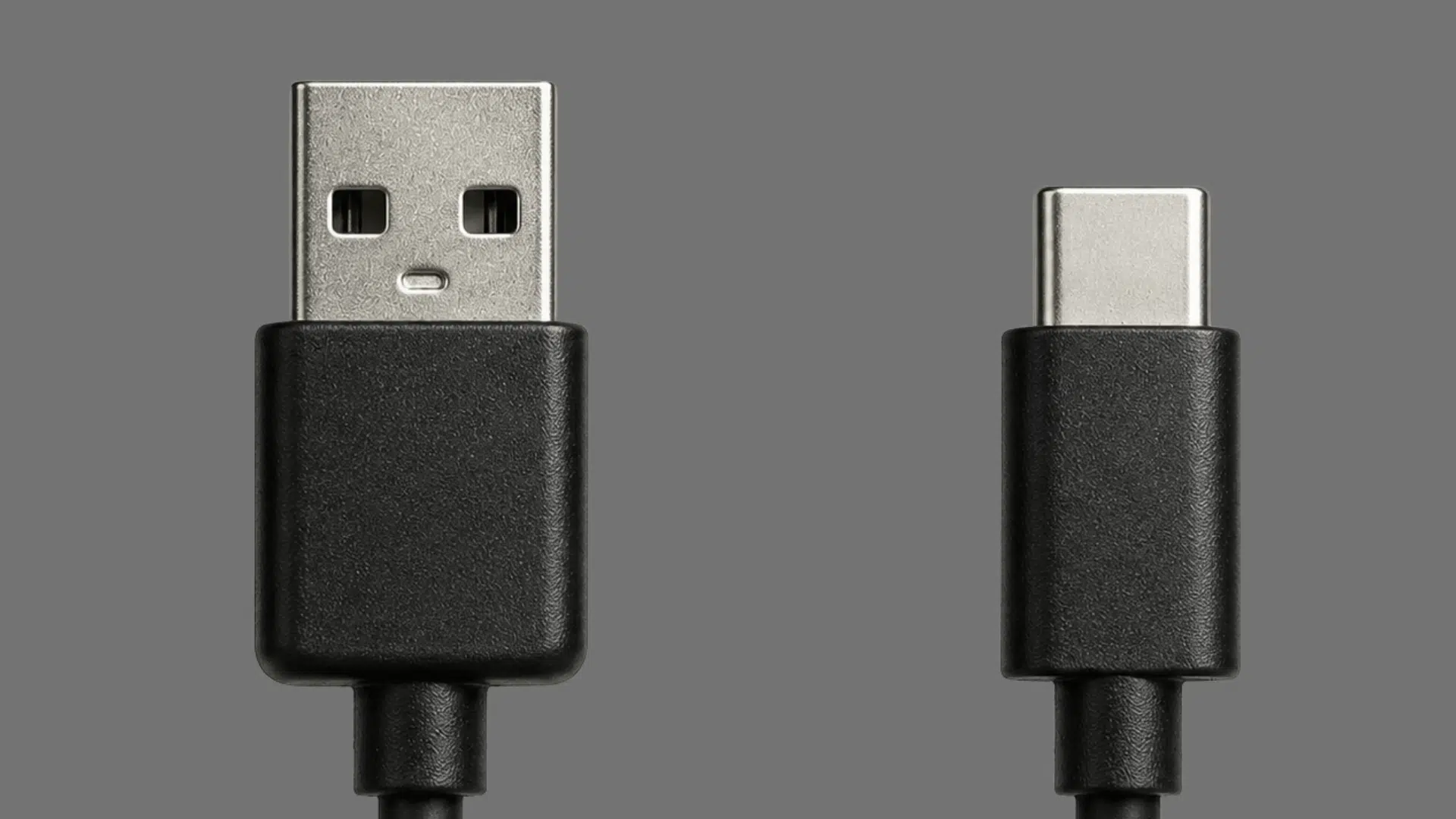
USB-A is the traditional rectangular USB connector widely used in computers, chargers, and electronic accessories for decades.
USB-A ports support different USB standards, including USB 2.0, USB 3.0, and newer versions, which determine data transfer speed and power output.
Although newer devices are increasingly adopting USB-C, USB-A remains popular because of its broad compatibility with existing accessories.
Performance depends on the supported USB standard, cable quality, and the connected devices.
It is commonly found on devices such as laptops, desktop computers, keyboards, mice, printers, and external storage drives.
What is USB-C?
USB-C is a compact, modern connector used for charging, data transfer, and connecting devices.
Its small oval shape is different from the older rectangular USB-A connector, and its reversible design allows it to be plugged in either way.
USB-C is common on smartphones, laptops, tablets, monitors, and many other electronics.
It can support standards such as USB 3.x and USB4 for faster data transfer. It may also support USB Power Delivery for higher charging power.
However, not every USB-C port offers the same performance. Transfer speed, charging power, and features depend on the device, USB standard, and cable being used.
USB-A vs USB-C Performance Comparison
This table compares USB-A and USB-C across data speeds, charging power, video support, and other key performance capabilities.
| Performance Factor | USB-A | USB-C |
|---|---|---|
| Maximum practical USB data standard | Up to 10 Gbps | USB4 up to 80 Gbps |
| Reversible connector | No | Yes |
| USB Power Delivery | No | Yes |
| Maximum USB PD power | Not supported through USB-A | Up to 240W with compatible hardware |
| Video support | Limited/implementation-dependent | DisplayPort Alt Mode on supported ports |
| Modern high-performance use | Limited | Better suited |
USB-A vs USB-C: Key Differences

USB-A and USB-C have noticeably different connector designs that affect everyday usability.
- USB-A: USB-A uses a larger rectangular plug that fits into the port in only one direction. Users must align the connector correctly before inserting it, which can make it less convenient.
- USB-C: USB-C has a smaller, oval-shaped connector with a reversible 24-pin design. It can be inserted either way, making connections quicker and easier on phones, tablets, laptops, and other compact devices.
2. Maximum Data Transfer Speeds
Both connectors support multiple USB standards, but USB-C can handle newer and faster specifications.
- USB-A: USB-A can support USB standards with speeds up to 10 Gbps, depending on the port, cable, and connected hardware. The 20 Gbps USB 3.2 Gen 2×2 mode requires USB-C.
- USB-C: USB-C supports USB 2.0, USB 3.x, and USB4. USB4 can reach up to 40 Gbps, while USB4 Version 2.0 supports speeds of up to 80 Gbps with compatible ports, cables, and devices.
3. Charging Power and USB PD
USB-C provides greater charging capability than USB-A, especially for higher-power devices.
- USB-A: USB-A generally supports lower charging power, while USB-C can use USB Power Delivery to negotiate much higher power levels with compatible devices.
- USB-C: USB-C supports USB Power Delivery up to 240 watts, enabling faster, higher-power charging for phones, tablets, laptops, and other compatible devices.
4. Device Compatibility and Adoption
USB-A remains useful for older hardware, while USB-C is increasingly common on newer electronics.
- USB-A: USB-A is widely found on older laptops, desktops, TVs, vehicles, chargers, and accessories. Its broad legacy support makes it useful when connecting devices that still rely on traditional USB ports.
- USB-C: USB-C is common on newer phones, laptops, tablets, and headphones. Its adoption is growing further due to regulations requiring USB-C charging on many portable electronic devices.
USB-A vs USB-C: Pros and Cons
Both connectors have clear advantages and limitations depending on the device and intended use.
| Category | USB-A | USB-C |
|---|---|---|
| Pros | Wide support for older devices | Reversible and compact design |
| Common on computers and accessories | Supports newer USB standards | |
| Reliable for basic connections | Supports higher charging power | |
| Cons | Fits only one way | Features vary by port and cable |
| Limited newer charging support | May need adapters for older devices | |
| Less common on new devices | Full performance needs compatible hardware |
Can USB-A and USB-C Work Together?
Yes, USB-A and USB-C can work together when you use a compatible cable or adapter.
This makes it possible to connect newer USB-C devices with older computers, chargers, cars, hubs, and accessories that still have USB-A ports.
A USB-A to USB-C cable can charge compatible phones, tablets, headphones, and other devices while also supporting data transfer when the hardware allows it.
However, connecting USB-C to USB-A does not provide all the performance benefits associated with newer USB-C connections.
Transfer speed and charging power are limited by the capabilities of the port, cable, and connected device.
For higher charging power, faster data rates, or newer features, a compatible USB-C to USB-C connection is generally the better choice.
Which One Should You Actually Use?

The better choice depends on your device, performance needs, and how you plan to use the connector.
1. Phones and Tablets: USB-C is the better choice for most newer models because it supports modern charging and data connections.
2. Laptops: Many current laptops use USB-C for charging, file transfers, displays, and accessories, reducing the need for multiple ports.
3. Older Accessories: USB-A is still useful for keyboards, mice, printers, and other legacy peripherals that use traditional connections.
4. Cars and Hubs: Older vehicles and hubs may still rely on USB-A, so check the available port before buying cables.
5. New Devices: USB-C is increasingly common across newer electronics, making it a practical choice for future purchases.
6. Cable Setup: Using more USB-C devices can also reduce the number of different cable types needed for everyday use.
Is USB-C Always Faster Than USB-A?
No, USB-C is not always faster than USB-A because connector shape alone does not determine data transfer speed.
Actual performance depends on the USB standard supported by the port, cable, and connected device. For example, a USB-C connection running USB 2.0 can be slower than a USB-A connection supporting USB 3.2.
However, USB-C supports newer standards such as USB4 that USB-A cannot use, giving compatible USB-C devices much higher maximum speeds.
Always check the supported USB standard rather than assuming every USB-C connection provides faster transfers.
Conclusion
By now, you know the real story behind USB-A vs. USB-C.
USB-A is the older, one-way plug still found on many accessories, while USB-C is the smaller, reversible connector built for faster speeds and stronger charging power.
Speed and charging depend on the USB standard inside the cable, not just the shape, but USB-C is where all the newest technology, like USB4 and 240-watt charging, actually lives.
USB-A still works well for older gear, while USB-C is the smarter pick for new devices. Before your next purchase, check your device’s port type so you grab the right cable the first time.
Frequently Asked Questions
Can USB-C Replace HDMI Cables for Displays?
Yes, some USB-C ports support video output through DisplayPort Alt Mode, but compatibility depends on the specific device and port.
Do All USB-C Cables Support Fast Charging?
No, charging speed varies by cable. Higher-power charging may require 5A USB-C cables with E-Marker chips and compatible devices.
Can a USB-C Port Transfer Data and Charge at The Same Time?
Yes, many USB-C ports can transfer data and charge simultaneously when the cable, port, and connected device support both functions.